Ever since Google bought Feedburner they have been working towards placing Adsense on the Feedburner feeds. No surprise there as G needs to keep growing and Adsense/Adwords is what feeds the beast. A few months back Feedburner made Adsense available and I attempted to try it but for what ever reason it didn't work. No doubt I screwed things up - not a surprise either as most of you know I am not technically gifted and spent about 5 seconds trying to figure out what went wrong before ditching the whole works.
Long story short - a few days ago I noticed a new link on my Adsense Overview page (see image below) which is entitled Adsense for Feeds. Of course it may have been there for a while and I just didn't notice it until now.
Click Image to enlarge

Needless to say I clicked the "Get Started" button. I was taken to the following page.
Click Image

Naturally it told me that I had no feeds in my account and gave me a link to "View our Account Migration Guide". Apparently you will have to have Google migrate all your feeds from Feedburner to Adsense. Turns out this isn't complicated.
Click Image

In fact Google will do it for you. This is right up my alley - anytime I can get someone else to do the tech stuff suits me just fine. Just ask my good friend Terry! Just give Google your Feedburner username and provide your Adsense email address and they will do the necessary steps for you.
So I did and am waiting to see what happens next.
Now I'm telling all you folks this because should things work out all of my feed subscribers will be snarling and nashing their teeth as soon as the Adsense ads start appearing on my feeds. Before you all hit the unsubscribe button please hear me out.
This whole Adsense on Feeds thing has me more than curious as it just doesn't fit in with Google's current policies. How are they going to assure quality clicks for the Advertisers? At present they frown on too many clicks coming from the same IP. One of the things you have to be careful of is that some of your readers may try and help you by clicking your ads repeatedly. This doesn't help at all and can get your account banned. Clicks have to be natural and repeated clicks from the same IP is not natural.
However, if I have Adsense on my Feeds then I am only going to get clicks from my readers. Search traffic will not see these ads. Presumably G wants my readers to click the ads - if not then why offer the service. So does this mean that they won't mind the same people clicking ads on a more frequent basis? They can hardly penalize me for repeated clicks when my pool of readers is limited. This, in a nutshell, is what I want to find out. In one sense my readers are highly targeted for my keywords and Google likes that. I suppose they feel this will benefit the Advertisers - maybe it will. On the other hand this just seems ripe for abuse and I am curious as to how G plans on counting clicks. Which will they consider valid and which will be considered suspect?
I am asking you dear readers not to get all un-subscribe on my ass when the ads appear as I simply want to see how this program is going to be monitored by Google. I will certainly keep you abreast of my findings. I should also say that this is not a call to entice you to click those ads. Please, please, please... don't unless it is something you really are interested in. I have no wish to game Adsense in any way and you shouldn't either. I suspect that my readers will ignore them in the same way they ignore the ads on my blog - just background noise that bloggers tend not to notice. I understand why search traffic clicks ads - I don't understand why targeted feed subscribers ever would though. And I don't understand why Google thinks they would either.
In any event you now know up front what I'm up too and I hope you will not get offended when you see the ads. Just another little experiment and I'll fill you in when I get some results.
Read More......
Labels: AdSense Tips, Feed Optimization
One of the most popular (and recurring) questions our publishers ask is, "How do I maximize revenue for AdSense for feeds and ensure my subscriber stats are as accurate as possible?" Some of you can recite the answers to these questions backwards and forwards (though we find typing it backwards is quite difficult, so we'll leave you to say that aloud). But for our many new publishers that are just tuning in, here's the recap.
Just setting up AdSense for feeds ad units in your AdSense account is not enough to start seeing traffic and revenue to your feeds. It's critical that 100% of your feed traffic be directed to the feed(s) you created in AdSense for feeds or your FeedBurner account. Luckily, this is fairly easy to do via two standard methods.
- Redirect your original feed. This is the recommended option for all publishers, but especially if you have an already established blog or feed that already has subscribers. This option ensures that all traffic gets funneled to the version that has both advertising and subscriber tracking enabled. We've detailed this process in this Help Center entry.
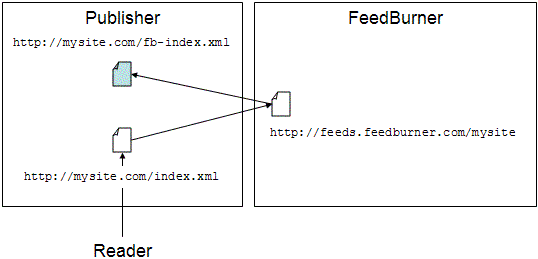
An added bonus: a plugin for self-hosted WordPress installations and feed-specific features within Blogger and TypePad make redirection much easier on these two publishing platforms.
- Promote your feeds.feedburner.com feed. This is recommended only in the cases where you are setting up a new blog, or have an existing blog or feed that has no traffic. For example, if your feed is found at http://feeds.feedburner.com/toastforbreakfast, you would change your blog template to link only to this version of the feed. Note you have to make sure to change it not only where you promote your feed directly, but also everywhere you have feed autodiscovery links in your template. (One other place to keep in mind: BrowserFriendly.)
Hopefully, this reminder will help everyone get on firm ground with how to maximize traffic to their feed and revenue from it, too. In future posts, we will be covering how to
increase traffic and subscribers to your feed, so hang on to your hat!
Posted by Steve Olechowski - Product Manager, AdSense for feeds
Labels: Announcements, Feed Placements
Along with the
clarification regarding the doubleclick.net domain we posted a few weeks ago over at
Inside AdSense, we thought we would mention that we have made similar changes to the AdSense for feeds ad tags that are being placed in feeds. By changing our ad serving to the doubleclick.net domain, we are now allowing advertisers to more easily create campaigns that span all media platform types on the Google Content Network, including sites, feeds, and mobile.
By making it easier for advertisers to buy ads in your feeds, and by supporting the exact same features and ad formats that are accepted on websites, the competition for your ad space should increase to help ensure that you're maximizing your earnings potential.
Read More......
If you use
link units, you may have noticed a small addition to the page users see after clicking a link unit topic. We recently added an image ad to the bottom of each of these pages, after our testing showed revenue improvements for many publishers.

These image ads are contextually targeted, based on the link unit topic users clicked to reach the ads. If no image ads are available for the given topic, we'll only show the original text ads -- in other words, we won't show a PSA or insert a blank space in place of the image ad in this case. Advertisers can bid on these image ads on a cost-per-click (CPC) and cost-per-impression (CPM) basis, so you'll generate earnings for valid clicks and impressions. You can review the performance of image ads on your link unit pages by generating a
link unit report on your Advanced Reports page.
If you aren't using link units on your pages, we encourage you to
give them a try. They don't take up much space and can help add to your AdSense revenue -- learn more in our
Help Center, or visit your
AdSense Setup tab and select 'AdSense for content' to get started.
Posted by Arlene Lee - Inside AdSense Team
Read More......

Whether you're new to this blog or have been with us since way back in
August of aught five, we'd like to provide a few simple tips for effectively using the features provided on our site.
First of all, we've made it easy to subscribe to the blog so that you'll never miss a post. There are a few ways to do so:
- E-mail
Have a Google Account? Then visit our subscription page, or just enter your email address into the yellow box on the right sidebar of this page. You'll be subscribed via Google Groups, and we'll send you a confirmation email. Once you confirm your subscription, you'll begin to see new blog posts in your email inbox.
- RSS Reader
After clicking on the 'Site Feed' link in the upper right-hand corner of this page, you'll be taken to a Feedburner URL, which you can access from any RSS Reader or Live Bookmark of your choice. To view all of your feed subscription options, look for the 'Subscribe Now!' box on the right side.
- iGoogle
Click the white '+ Google' icon on the top right, and you can receive the latest Inside AdSense updates on your iGoogle page or within Google Reader.

There's also plenty of content in our blog archives. Here are some ways to access some of those useful posts from the past:
- Labels
Each post is tagged at the bottom with one or more labels that reflect the content of that post. All of these labels are also listed on our sidebar, which you can use to sort through past posts - for instance, click the 'Optimization' label to view all the posts related to optimizing AdSense on your site. You'll notice that this post is tagged with 'Newbie', since that's been our focus on recent Fridays.
- "You may have missed..."
This name says it all - check the right sidebar for this section, where we'll be rotating links to useful posts from past months.
- Search box
You can search for the topic of your choice using the search box at the top right. Using the tabs on the results page, you can choose whether to search within the AdSense blog or other resources such as our Help Center, the AdSense Forum, and the web.

We hope these tips will help you become a pro at navigating and absorbing our blog posts in the future!
Posted by Takayuki Funakoshi - AdSense Publisher Support
Read More......


